





Fundraiser Help
We use PayPal for payment processing on GivingGrid.com. It's both safe and secure.
- Everyone knows PayPal.
- PayPal fees are 2.59% + $.49 per transaction. Certified 501c3 nonprofits can get a reduced rate of 1.99% + $.49 directly through PayPal. GivingGrid cannot help with that.
- All donations go directly into your account, less PayPal fees.
- Funds are typically available within 1-2 days.
- Great for organizations based outside of the U.S. PayPal is available in most countries around the world, so fundraisers can be set-up almost anywhere and donations can be accepted from most countries (and their currencies) throughout the world. Currently, GivingGrids can be set-up using US Dollars, British Pounds, Euros, Canadian Dollars and Australian Dollars.
Zero! GivingGrid doesn't charge you any fees!
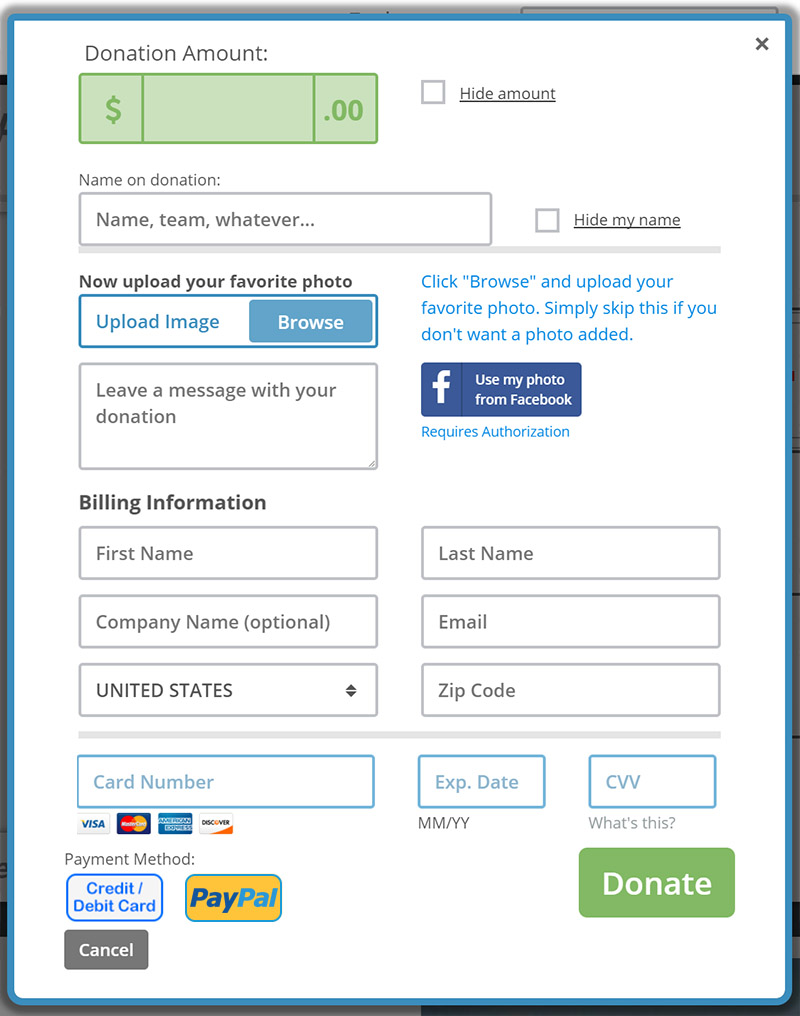
With GivingGrid you only pay third party credit card processing fees directly to the payment processor. Those are roughly 2%, plus a small transaction fee, if you are a 501c3.
So how does GivingGrid pay for its operating expenses and keep the lights on?
We apply a unique method where the donor is given the option to add a small contribution for us, in addition to their donation. Think of it as a tip. If they think we're providing a valuable service, they give us a little something. If not, they have the option to lower it or make it zero and give us nothing. No matter what, the fundraiser never gets hit with a fee from us and GivingGrid assumes all the risk! Sound fair?
Simple! The money you raise goes directly into your PayPal account. From there it's up to you. GivingGrid never touches the funds.
If you have any questions about getting the money you've already raised, please contact PayPal. Click the link below to contact them:
Of course it's always much better (and fun) when you hit or crush your goal, but you get the funds you raise either way. GivingGrid does not offer an "all or nothing" option.
It could be because you set a "Start Date" in the future. Go to your Settings and check the Start Date. Settings > Additional Settings > Set Start & End Dates. If that's the problem, just adjust it to today if you want it to show now. You should also make sure you not receiving any error messages, due to missing required fields or incorrect input.
If neither of these things are the problem, click contact us and we'll look into it ASAP and get back to you.
No, unfortunately we no longer allow personal fundraisers.
However, if you have fundraised with us in the past and want to run another campaign, please reach out to us. We may be able to make an exception...
Yes. GivingGrid only allows certified nonprofit organizations to fundraise on its platform.
We no longer allow personal fundraisers. However, if you have fundraised with us in the past and want to run another campaign, please reach out to us. We may be able to make an exception...
First, make sure you're logged in. Then click on your name in the upper right-hand corner of the screen on a PC or Mac and then click on "Account." If you're on a phone, click on the menu button and then click on "Account."
If you don't know your password, you'll need to reset it by clicking the "Login" button and then look for "Forgot your password?" Click the link.
There are some great marketing tools available to you, after you launch your campaign. First, a big pop-up with all kinds of options will come up automatically when you launch and if you're not quite ready, you can always go to "My Promo Page," which you will find in your settings for all launched campaigns. It's a big orange button.
Yes for Standard GivingGrids and Wall of Love, but not for Urgent Help! We don't offer it for Urgent Help, because the typical campaign is over in just a few days.
Make sure you're logged in and go to Settings > Additional Settings > Run on Your Website and follow the instructions. Everything is synced, so a donation made on your website updates everywhere else. One thing to note, if you don't allocate enough space, we'll automatically show a very cool widget. Details are in your settings.
The short answer is no. You can't run your live GivingGrid campaign on Facebook (like you can on your website), but you can post the link to your campaign to your Facebook page. That will also display an image from your campaign and when someone clicks on the post, they'll be taken to your live campaign.
Make sure you're logged in, click the "Reports" button at the top of the screen and your donor data will appear. You can also download it as a .csv file by clicking the "Download Donor Data" button.

Here's an example:
Offline donations can be made on all of our platforms. Make sure you're logged in and go to Settings > Additional Settings > Manage Offline Donations. We recommend that you do not enter any offline donations until you've had several online donations. That way potential donors won't be confused by the fact that you've raised money, but there aren't any squares taken.
Note: This feature allows you to increase the total amount raised on your campaign, but it does not record any information or input donor information, photos or messages into the squares on the grid.
Important: Once you enter an offline donation, it is not reversable and you cannot edit the amount, so be careful. Do not enter cents, only whole dollar amounts.
For Standard GivingGrids
Make sure you're logged in and go to Settings > Fundraising Goal & Grid Type. Next to your goal above the preview grid, click the edit link. Change your goal in the pop-up and click submit.
For Wall of Love
If you have a goal (it's optional), just go to General Settings, change it and click save.
For Urgent Help
Go to General Settings, change it and click save.
Note: be careful how you use this function. Don't get in the habit of raising your goal, just because you're close to hitting it or have already passed it. That's great and people want to see you beat it big-time! If you keep raising it, donors will start to wonder why you even have a goal and lose interest. One increase would be the maximum we'd recommend. It's primarily there to lower your goal if you were a little too ambitious and set it too high.
For 1,2,3
You change your goal by changing the number of squares in General Settings. Once you get your first donation, you are locked in and can no longer change the goal.
The minimum is $5.
You can easily add, change or delete any of those things even after launching. Make sure you're logged in and click on "Settings" for the campaign you'd like to change. You'll see all the options.
For Standard GivingGrids, make sure you're logged in and go to Settings > Fundraising Goal & Grid Type. This is to do it manually. There's also an automatic feature (on Blank Squares) you can turn off or on in your settings. We recommend you leave it on and let it happen automatically when needed. Then you'll never run out of squares. Anytime 75% of your squares are taken, another ring of squares is added.
- If your GivingGrid is a Blanks Squares grid, there's a big button near the top that says "Add More Squares." Click it and it will add another ring of squares.
- If your GivingGrid is a Preset grid, you simply add a new ring from "Fundraising Goal & Grid Type" in your Settings. After your first donation, you can't add squares the same way. A new option appears near the bottom of the page, to add individual squares.
For Urgent Help campaigns, make sure you're logged in and go to Settings > Grid Settings and click the Add Squares button. This is to do it manually. There's also an automatic feature you can turn off or on in your settings. We recommend you leave it on and let it happen automatically when needed. Then you'll never run out of squares. Anytime 75% of your squares are taken, another ring of squares is added.
Please note: Once you receive your first donation, you can still add squares, but you cannot delete them.
For Wall of Love, it's all automatic, unless you turn it off in your settings. Anytime 75% of your squares are taken, another ring of squares is added.
You cannot add squares to a 1,2,3 campaign.
This feature is available on Standard GivingGrids, Wall of Love, Urgent Help and 1,2,3. Make sure you're logged in and go to Settings > Additional Settings > Set Start & End Dates.
This feature is not available with Blaze.
Someone clicks on a square and gets this message:
"This square is currently on hold for another supporter for X MORE MINUTES. Please pick another square or if this is the square you've got to have, you can check back in a little bit. Maybe they won't take it before their time is up? You can also keep clicking this check again button. Maybe they'll cancel it before their time is up?"
GivingGrid works just like when you buy theatre or event tickets online with reserved seating. When someone clicks on a square we hold it for them for 15 minutes to complete the donation. If they don't complete their donation in 15 minutes or if they click on another square, that square becomes available again.
Yes you can and we encourage it! It adds credibility to your campaign. You do that in Settings > Organization Information.
We recommend only linking to your homepage.
You can delete any GivingGrid or Wall of Love (WOL) in your account that has not had any donations. Simply go to your dashboard and click the "delete" button for the campaign you'd like to remove. To get to your dashboard, make sure you’re logged in and click your name (the drop-down menu) in the upper right-hand corner of the screen.
Unless there are special circumstances, you cannot delete campaigns that have had donations. Once someone donates to a campaign, we're obligated to leave it available, so they can view or share their donation. If you believe there are special circumstances, please contact us.
You can also simply stop your campaign from accepting donations by changing the end date for the campaign. Make sure you're logged in and go to the campaign. Then go to Settings> Additional Settings > Set Start & End Dates. You'd then want to enter an end date of yesterday and click save.
To remove your account, please contact us. Unless there are special circumstances, we cannot delete accounts that are connected to GivingGrids that have had donations. Once someone donates to a campaign, we're obligated to leave that GivingGrid available, so they can view or share their donation. Therefore, the account also needs to be left intact.
Unfortunately, no. Each campaign must have a unique website address.
While we do not share specific information as to why an account has been suspended, it could be for many reasons, including but not limited to:
- Originating from a country not currently supported by GivingGrid.
- Not a nonprofit organization.
- Created a personal campaign.
- Suspected fraud.
- The nature of a campaign (i.e., offensive, abusive, making false claims, inappropriate for GivingGrid, etc.).
- Violates our "Terms of Use."
The simple difference between the two is that with a Standard GivingGrid the donor can upload a photo with their donation and with Wall of Love they post a heart and a message with their donation. No photo. Some campaigns work great with photos and other are better without, so you have both options.
We don't recommend Wall of Love for animal campaigns, because people love uploading photos of their fur kids.
GivingGrid is a free service and our entire income comes from optional tips provided by donors. We do our very best to provide speedy customer support to everyone, but we do have limits. While we rarely reach these limits, we cannot continue to provide support to users who have an excessive amount of customer service requests or are abusive or disrespectful of GivingGrid support personnel.
We hope you understand.
Keeping your donors up-to-date is super important! How would you feel if you donated money to a cause and never heard from them again? With GivingGrids and Wall of Love, you’re not only raising money, you’re expanding your supporter base. Stay in touch with these guys and do several “updates to donors” throughout your campaign and even after it ends. 30% of donors either donate a second time (as you near your goal) or refer people. That’s huge!
To prepare and send an update to donors, go to Settings > Send emails & updates > Keep your donors in the loop. You have some great editing capability, so you can add photos, links, bold text, etc. Make sure you click the Preview button to see what it will look like before you send the notification. If you want to send it right away, click the Send Update button, but we recommend previewing it first. If you’re not quite ready to send, make sure you click save at the top or bottom of the page. It will be there when you come back.
We hope you don't want to do that...
During the donation process we make it very clear to the donor that these tips are optional. That being said, these tips are our only source of income. We rely on them to keep the lights on and provide you and your donors with the support you need.
If you still feel the need to write something in your campaign that in any way suggests to donors that they don’t need to tip us or not to tip us, we won’t stop you and we’ll still allow you to use our service. However, we will not be able to provide you or your donors with any support and there will be no exceptions. We hope you understand.
Yes and no. You are welcome to include a mailing address in case someone wants to mail you a check. There are still some people who don't want to donate online. What we don't allow is the direct solicitation encouraging people to donate online elsewhere. In other words, what you can't do is put a link to your website (or others) donation page (including Venmo or other payment services) on your campaign and ask people to go there and donate. It's confusing and why would you want to do that anyway?
If you still feel the need to include links or write something in your campaign that in any way suggests to donors that they can go elsewhere to donate, we won’t stop you and we’ll still allow you to use our service. However, we will not be able to provide you or your donors with any support and there will be no exceptions. We hope you understand.
Yes we do, but not all countries at this time. We also allow GivingGrids to be set-up using Pounds, Euros, Canadian dollars, Australian dollars and New Zealand dollars via PayPal. Simply choose the currency you want in your payment processing settings during set-up.
Yes, GivingGrids can also be set-up using British Pounds, Euros, Canadian dollars, Australian dollars and New Zealand dollars. through PayPal, assuming we offer our service in your country. Simply choose the currency you want in your payment processing settings during set-up.
Didn't find what you were looking for?
Just click the link below and we'll get back to you ASAP.
Send us a message.

 Make a donation
 Share on Facebook
 Post on X to your followers
  Email your friends